

一键资源地址替换工具 — UniApp发布小程序体积精简
2025年12月14日 09:22

闺蜜圈 小程序版本一直落后很多,之所以没更新主要的问题在于 uni 打包小程序之后体积太大了,体积大一个原因是组件压缩到了 vendor.js 中,一个文件就到了 1.1m(主包限制大小2048kb)。
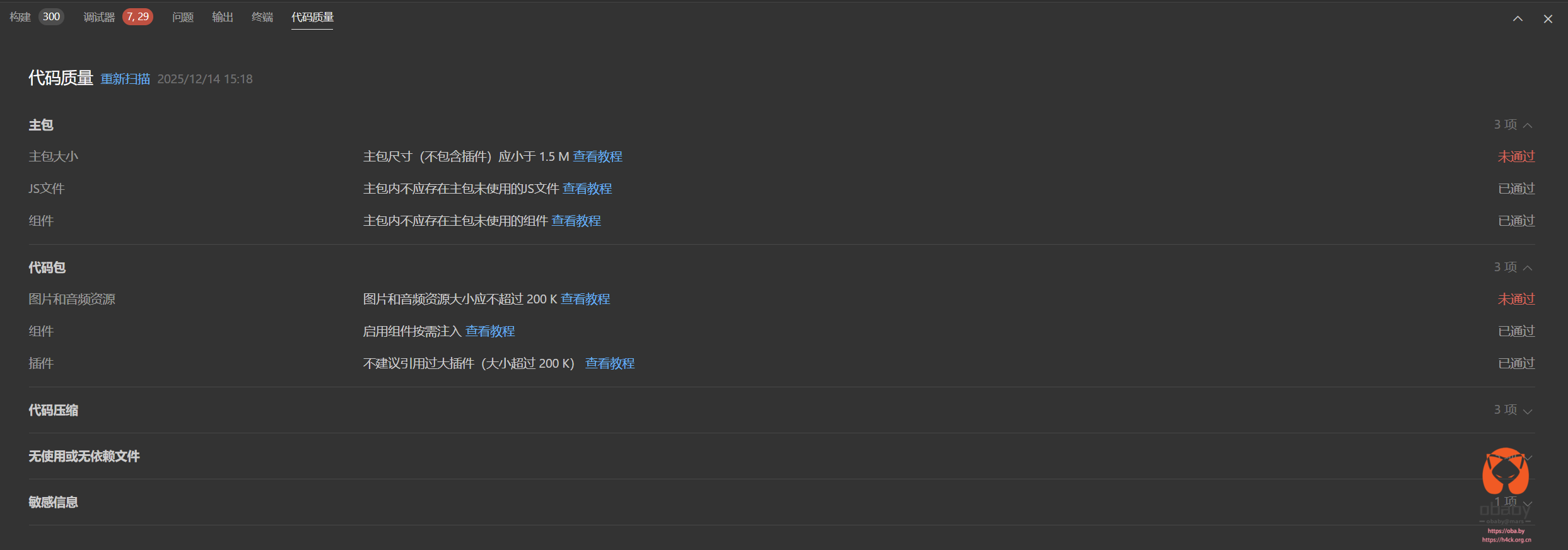
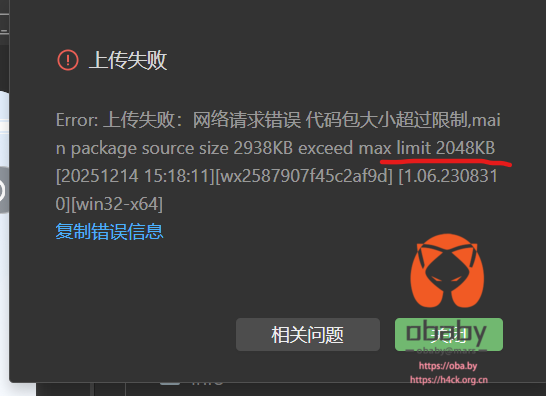

图片文件也有1m 左右,再加上其他的一些组件,主包的体积到了 4 m 左右。
虽然已经启用了分包,但是没啥效果,包括代码压缩组,所以最后发版的小程序靠的是压缩图片文件。
让 cursor 尝试写了个优化代码出了各种错误,最后决定采用将图片资源直接网络加载的方式来缩减体积,这样1m 的图片资源就不需要打包在本地资源中了。

本地资源文件都是通过 127 的地址来加载的,将资源移动到服务器之后,修改小程序资源地址之后:

此时加载的图片可以看到是从 cdn 加载了,

并且资源包大小已经基本可以忽略不计了

要实现上看的效果也简单,将static 目录上传到服务器,执行修改工具,修改资源路径删除本地资源。对于 tabbar 的图片不能通过网络加载,需要添加到排除列表,hbuilder 发行小程序后执行修改工具。此时基本就 ok 了,2.06mb,缺的那一点稍微弄一下也就解决了。
工具代码:
/**
 * 将打包后产物里的 /static/** 路径替换为 CDN 前缀。
 * 目前是替换为 https://cdn.guimiquan.cn/ 前缀。
 * 使用方法:
 *   1) 先发行构建微信小程序,生成 unpackage/dist/build/mp-weixin 或 unpackage/dist/dev/mp-weixin
 *   2) 执行:node cdn-rewrite.js [--mode=dist|dev] [--remove-static]
 *   3) 在 dist 内搜索或用开发者工具 Network 确认已变成 CDN 域名
 *
 * 参数说明:
 *   --mode=dist   : 处理生产构建目录 (默认)
 *   --mode=dev    : 处理开发构建目录
 *   --remove-static : 删除本地 static 目录(排除配置的目录和文件)
 * By: obaby
 * Date: 2025-12-12
 * Version: 1.0.0
 * https://oba.by
 * https://h4ck.org.cn
 * ------------------------------------------------------------
 */
const fs = require('fs');
const path = require('path');

// CDN 根路径,末尾带 /
const CDN = 'https://cdn.guimiquan.cn/';

// 路径配置
const DIST_ROOT = path.resolve(__dirname, 'unpackage/dist/build/mp-weixin');
const DEV_ROOT = path.resolve(__dirname, 'unpackage/dist/dev/mp-weixin');

// 处理的文件类型
const ALLOWED_EXTS = new Set(['.js', '.json', '.wxss', '.css', '.wxml', '.html']);
// 跳过的文件(app.json 里的 tabBar iconPath 不允许 http/https)
const SKIP_FILES = new Set(['app.json']);

// 排除删除的目录(相对于 static 目录)
const EXCLUDE_DIRS = [
  'tabbar_icons',  // tab栏图标必须使用本地文件
  // 可以在这里添加更多需要排除的目录
];

// 排除删除的文件(相对于 static 目录,支持 glob 模式或完整路径)
const EXCLUDE_FILES = [
  // 可以在这里添加需要排除的文件,例如:
  // 'tabbar_icons/**/*',
  // 'custom-icon.png',
  'icons/record_love_add.png',
  'icons/calendar_icon_project_start.png',
  'icons/calendar_icon_project_end.png',
  'icons/calendar_icon_project_start_invalid.png',
  'apk_emotion_2.png',
  'apk_emotion_1.png',
  'apk_emotion_38.png',
  'apk_emotion_9.png',
  'apk_emotion_28.png',
];

// 解析命令行参数
function parseArgs() {
  const args = {
    mode: 'dist',  // 默认使用 dist
    removeStatic: false
  };

  process.argv.slice(2).forEach(arg => {
    if (arg.startsWith('--mode=')) {
      const mode = arg.split('=')[1];
      if (mode === 'dist' || mode === 'dev') {
        args.mode = mode;
      } else {
        console.warn(`警告: 未知的模式 "${mode}", 使用默认模式 "dist"`);
      }
    } else if (arg === '--remove-static') {
      args.removeStatic = true;
    }
  });

  return args;
}

// 获取目标根目录
function getTargetRoot(mode) {
  return mode === 'dev' ? DEV_ROOT : DIST_ROOT;
}

function replaceInFile(file, targetRoot) {
  const source = fs.readFileSync(file, 'utf8');
  let output = source;

  // 处理 JS/JSON 中的字符串形式 "static/xxx" 或 "/static/xxx"
  output = output.replace(/(["'])\/?static\//g, `$1${CDN}static/`);

  // 处理样式中的 url(static/xxx) 或 url('/static/xxx')
  output = output.replace(/url\(\s*(['"]?)\/?static\//g, `url($1${CDN}static/`);

  if (output !== source) {
    fs.writeFileSync(file, output, 'utf8');
    console.log('rewrote', path.relative(targetRoot, file));
  }
}

function walk(dir, targetRoot) {
  for (const entry of fs.readdirSync(dir, { withFileTypes: true })) {
    const full = path.join(dir, entry.name);
    if (entry.isDirectory()) {
      walk(full, targetRoot);
    } else if (ALLOWED_EXTS.has(path.extname(entry.name)) && !SKIP_FILES.has(entry.name)) {
      replaceInFile(full, targetRoot);
    }
  }
}

// 检查路径是否应该被排除
function shouldExclude(filePath, staticRoot) {
  const relativePath = path.relative(staticRoot, filePath);
  const normalizedPath = relativePath.replace(/\\/g, '/'); // 统一使用 / 分隔符

  // 检查是否在排除目录中
  for (const excludeDir of EXCLUDE_DIRS) {
    if (normalizedPath.startsWith(excludeDir + '/') || normalizedPath === excludeDir) {
      return true;
    }
  }

  // 检查是否匹配排除文件模式
  for (const excludeFile of EXCLUDE_FILES) {
    // 简单的 glob 匹配(支持 * 和 **)
    const pattern = excludeFile.replace(/\*\*/g, '.*').replace(/\*/g, '[^/]*');
    const regex = new RegExp('^' + pattern + '$');
    if (regex.test(normalizedPath)) {
      return true;
    }
    // 精确匹配
    if (normalizedPath === excludeFile) {
      return true;
    }
  }

  return false;
}

// 删除本地 static 目录(排除指定目录和文件)
function removeLocalStatic(targetRoot) {
  const staticDir = path.join(targetRoot, 'static');

  if (!fs.existsSync(staticDir)) {
    console.log('static 目录不存在:', staticDir);
    return;
  }

  let deletedCount = 0;
  let skippedCount = 0;

  function removeRecursive(dir) {
    const entries = fs.readdirSync(dir, { withFileTypes: true });

    for (const entry of entries) {
      const fullPath = path.join(dir, entry.name);

      if (shouldExclude(fullPath, staticDir)) {
        skippedCount++;
        console.log('跳过(排除):', path.relative(staticDir, fullPath));
        continue;
      }

      if (entry.isDirectory()) {
        removeRecursive(fullPath);
        // 目录为空时才删除
        try {
          fs.rmdirSync(fullPath);
          deletedCount++;
        } catch (err) {
          // 目录不为空,忽略错误
        }
      } else {
        fs.unlinkSync(fullPath);
        deletedCount++;
      }
    }
  }

  removeRecursive(staticDir);

  // 如果 static 目录为空,尝试删除它
  try {
    const remaining = fs.readdirSync(staticDir);
    if (remaining.length === 0) {
      fs.rmdirSync(staticDir);
      console.log('已删除空的 static 目录');
    } else {
      console.log(`static 目录保留,包含 ${remaining.length} 个排除项`);
    }
  } catch (err) {
    // static 目录已被删除或无法访问
  }

  console.log(`删除完成: 已删除 ${deletedCount} 项, 跳过 ${skippedCount} 项`);
}

// 主函数
function main() {
  const args = parseArgs();
  const targetRoot = getTargetRoot(args.mode);

  console.log(`模式: ${args.mode}`);
  console.log(`目标目录: ${targetRoot}`);

  if (!fs.existsSync(targetRoot)) {
    console.error('目标目录不存在:', targetRoot);
    process.exit(1);
  }

  walk(targetRoot, targetRoot);
  console.log('路径替换完成');

  if (args.removeStatic) {
    console.log('\n开始删除本地 static 目录...');
    removeLocalStatic(targetRoot);
  } else {
    console.log('\n提示: 使用 --remove-static 参数可删除本地 static 目录');
  }

  console.log('\n完成');
}

main();
使用方法,放到项目根目录下,打包之后执行:
node cdn-rewrite.js [--mode=dist|dev] [--remove-static]
